


YTV Player Pro
4.1896.00 Reviews
App Specs
- Version
- 15.0
- Updated On
- License
- Free
- Downloads
- 50,000,000+
- Developer
- Prod ADP
- Categories
- Video Players & Editors
- Platform
- Android, iOS
Screenshots
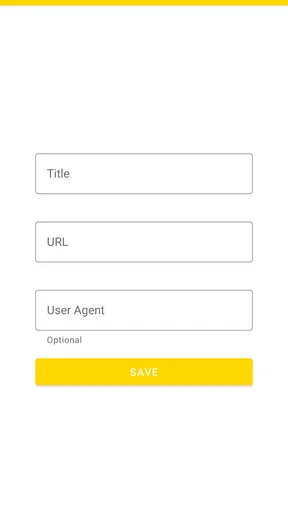
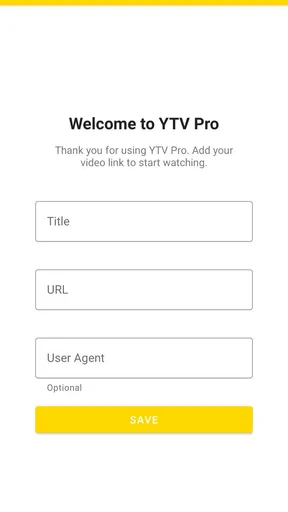
 Analysis by AppCompare
I judge YTV Player Pro by a simple question: does it make a video link easier to watch without asking me to reorganize my whole viewing routine? Its focus is narrow and useful. Rather than being a full streaming service with a catalogue to browse, it is a video player built around opening links. That makes it appealing when you already have a source and want a straightforward way to play it, but less compelling if you expect recommendations, subscriptions, or a library of shows.
Where a link-based player earns its place
The most practical reason I’d keep a player like this around is that a video link often arrives outside the apps I normally use: in a message, a saved note, or a page I want to revisit later. A dedicated player can make that handoff simpler than repeatedly switching between a browser and whatever playback controls the page provides. I’d use it as a companion tool, not as a replacement for every video app on my phone.
That distinction also helps set expectations. YTV Player Pro does not supply the videos; the link is the starting point. If a link is unavailable, restricted, or no longer works, a player cannot make the source accessible. I would first check that the address is complete and intended to be playable, then try it in the player. This small habit can save time when a pasted link seems to do nothing.
A useful routine for everyday watching
Imagine a friend sends a long clip while I’m commuting, and I want to watch it later on a stable connection. I can save the link in a note, open it when I have time, and use a dedicated player rather than hunting through a crowded browser history. The benefit is not magic streaming; it is keeping the playback task separate from browsing. For anyone who regularly handles video URLs, that modest convenience can add up.
For longer viewing, I’d make a quick check before settling in: confirm the source opens, choose subtitles if needed, and set the playback speed before the video gets going. If the link points to a stream that depends on a webpage session or a sign-in, the player may not behave like the original site. In that case, returning to the source’s own app or browser is the sensible fallback, rather than repeatedly troubleshooting the player.
How it fits beside familiar alternatives
Compared with a browser, a dedicated video player is most attractive when I want playback controls to be the main event. A browser remains better for pages that combine the video with comments, captions, account access, or other site features. Compared with a subscription streaming app, YTV Player Pro has a different job entirely: those services organize licensed catalogues, while this app is useful when I bring a link of my own. Neither is a direct substitute for the other.
It is also worth separating a general-purpose player from a file manager. If most of my videos are already stored locally and I need to sort folders, rename files, or keep an archive tidy, a file-focused app may suit me better. If I mainly want to open video links, a link-oriented player is the more natural fit. Thinking about where the video comes from is the clearest way to decide which tool belongs on the home screen.
Worth Reading Before You Choose

Flipboard Shows What News Apps Must Do Beyond the Feed

Switching to Android Auto Means Rethinking Your Driving Routine

Google Calendar Makes a Crowded Week Easier to Manage

Ludo King Makes the Most of the Minutes Between Plans

Baby Panda World Brings Quick Play to Modern Phones, but Its Game Library Feels Busy

ESPN’s Live Game View Makes Following Close Games Easier
First Impressions: Sleek and User-Friendly
My first impression of YTV Player Pro was that it’s incredibly sleek. The UI is clean, which is something I really appreciate. There’s nothing worse than an app that bombards you with ads and clutter, right? As soon as you launch it, you’ll notice how intuitive it feels. Everything is laid out in a way that just makes sense, which means less time fumbling around and more time watching your favorite shows.
Features That Stand Out
Now, let’s talk about the features. There are a few things that really stand out with this app. Firstly, the ability to play videos directly from URLs is a game-changer. If you’ve got a link, you can pretty much stream it without any fuss. This is perfect for those moments when you stumble across a video online and think, “I wish I could watch this on a bigger screen.”
Another cool feature is the support for various video formats. I tried playing different file types, and surprise!, they all worked like a charm. This flexibility means you don’t have to worry about converting files before watching. Just load them up and enjoy!
Performance: Smooth as Butter
Performance-wise, YTV Player Pro doesn’t disappoint. The videos load quickly, and I didn’t experience any buffering, which is honestly a blessing. We’ve all been there, waiting for a video to load and losing interest in the process. This app ensures that doesn’t happen. It’s smooth sailing from start to finish.
Plus, the quality of playback is top-notch. Whether you’re watching in HD or SD, the clarity is impressive. The app makes sure that whatever you’re watching looks fantastic, which is a big win in my book.
Customization and Personalization
One thing I really love about this app is how customizable it is. You can adjust various settings to tailor your viewing experience. From changing the playback speed to tweaking subtitle settings, there’s a lot you can do to make it your own. And let me tell you, having subtitles that sync perfectly is a relief!
There’s also a night mode, which is perfect for those late-night binge sessions. It’s easy on the eyes and makes watching in the dark a lot more comfortable.
What to expect from the player
When subtitles matter, I’d test them near the beginning of a video rather than waiting until an important scene. A subtitle track can be available but still need a timing adjustment to feel comfortable, and checking early avoids interrupting a longer watch. Playback speed is similarly worth setting before I settle in: a modest change can help with a lecture or tutorial, while normal speed is usually better for dialogue-heavy entertainment.
Format flexibility is handy, but it does not mean every file or link will behave identically. The source, encoding, connection, and device can all affect playback. If a video stutters, I’d compare another link or file before deciding the app itself is at fault. If only one source struggles, the issue may be that source; if several do, switching to a browser or another player is a reasonable test.
Who should choose it—and who should skip it
YTV Player Pro is a sensible option for people who often receive video URLs, keep useful clips in notes, or want a player alongside their usual browsing and streaming apps. It is also approachable for someone who simply wants to paste or open a link without learning a complex media workflow. Prod ADP develops the app, and its place among video players and editors is clear: the emphasis is on playback rather than editing footage.
I would skip it if I mainly want a curated entertainment catalogue, offline downloads from a subscription service, or tools for cutting and assembling video. Those needs call for a streaming service or an editor, not a link player. Likewise, viewers who rely on a particular website’s login, interactive captions, or page controls may have a smoother experience watching directly in that site’s app or browser.
Availability and a grounded verdict
The app is free and rated for Everyone, making it easy to consider for general household use. It has a 4.3 average from around 199,000 ratings, with over 50 million installs. Those figures suggest it has reached a broad audience, but I would still judge it by whether my own links work and whether its controls suit my habits. It was released on May 5, 2023, and version 15.0 is listed for devices running Android 6.0 or later.
My main reservation is the expectation gap created by the word “streaming.” A player can make playback convenient, but it cannot guarantee that every URL will be compatible, that every source will load quickly, or that a site’s own features will carry over. I’d keep the original webpage handy when a link depends on context, and I wouldn’t treat one failed stream as proof that all sources will fail—or assume every source will work perfectly.
You might be wondering if YTV Player Pro is worth the download. In my opinion, absolutely. If you’re someone who enjoys streaming and wants a reliable app that can handle different file types with ease, this is a solid choice. The lack of intrusive ads is a huge plus, and the range of features makes it a versatile tool for any video enthusiast.
In summary, YTV Player Pro is a fantastic app for anyone looking to enhance their video streaming experience. It’s user-friendly, feature-packed, and offers a smooth performance that’s hard to beat. So, if you’re on the hunt for a new video player, give it a try. You might just find it’s exactly what you’ve been looking for!
Pros
- User-friendly interface for easy navigation.
- Supports a wide range of video formats.
- Allows background playback for multitasking.
- Offers high-quality video streaming.
- Includes advanced subtitle options.
Cons
- Requires a stable internet connection.
- Limited customer support availability.
- Ads can interrupt free version users.
- Occasional buffering on lower-end devices.
- Subscription needed for premium features.
FAQs for YTV Player Pro
What features does YTV Player Pro offer?
YTV Player Pro offers a range of features including the ability to stream videos in high definition, support for various video formats, and a user-friendly interface. It also provides customization options like creating playlists, adding subtitles, and adjusting playback speed. Additionally, it supports Chromecast, allowing you to stream content directly to your TV.
Is YTV Player Pro compatible with both Android and iOS devices?
Yes, YTV Player Pro is designed to be compatible with both Android and iOS devices. The app is regularly updated to ensure smooth functionality across different operating systems. Users can download it from the Google Play Store for Android devices or the Apple App Store for iOS devices, ensuring a seamless experience on any platform.
Does YTV Player Pro contain ads, and is there a premium version?
YTV Player Pro is primarily a paid app, which means it is designed to be ad-free, providing a smooth viewing experience without interruptions. The absence of ads is one of its key selling points, although any additional premium features or in-app purchases will be clearly outlined within the app itself.
How can I troubleshoot streaming issues on YTV Player Pro?
If you're experiencing streaming issues with YTV Player Pro, first ensure your internet connection is stable. Try restarting the app or your device, and check for any updates that might resolve the issue. If problems persist, consult the app's support section or contact their customer service for further assistance.
Is it safe to download and use YTV Player Pro?
Yes, YTV Player Pro is safe to download and use. It's available on official app stores, ensuring it meets security and quality standards. However, users should avoid downloading the app from unofficial sources to prevent potential security risks. Always ensure your device's security settings are up-to-date for added protection.


